Everything you need to quote, invoice and get paid.
Built for service businesses and independent pros who work in the field, not behind a desk.
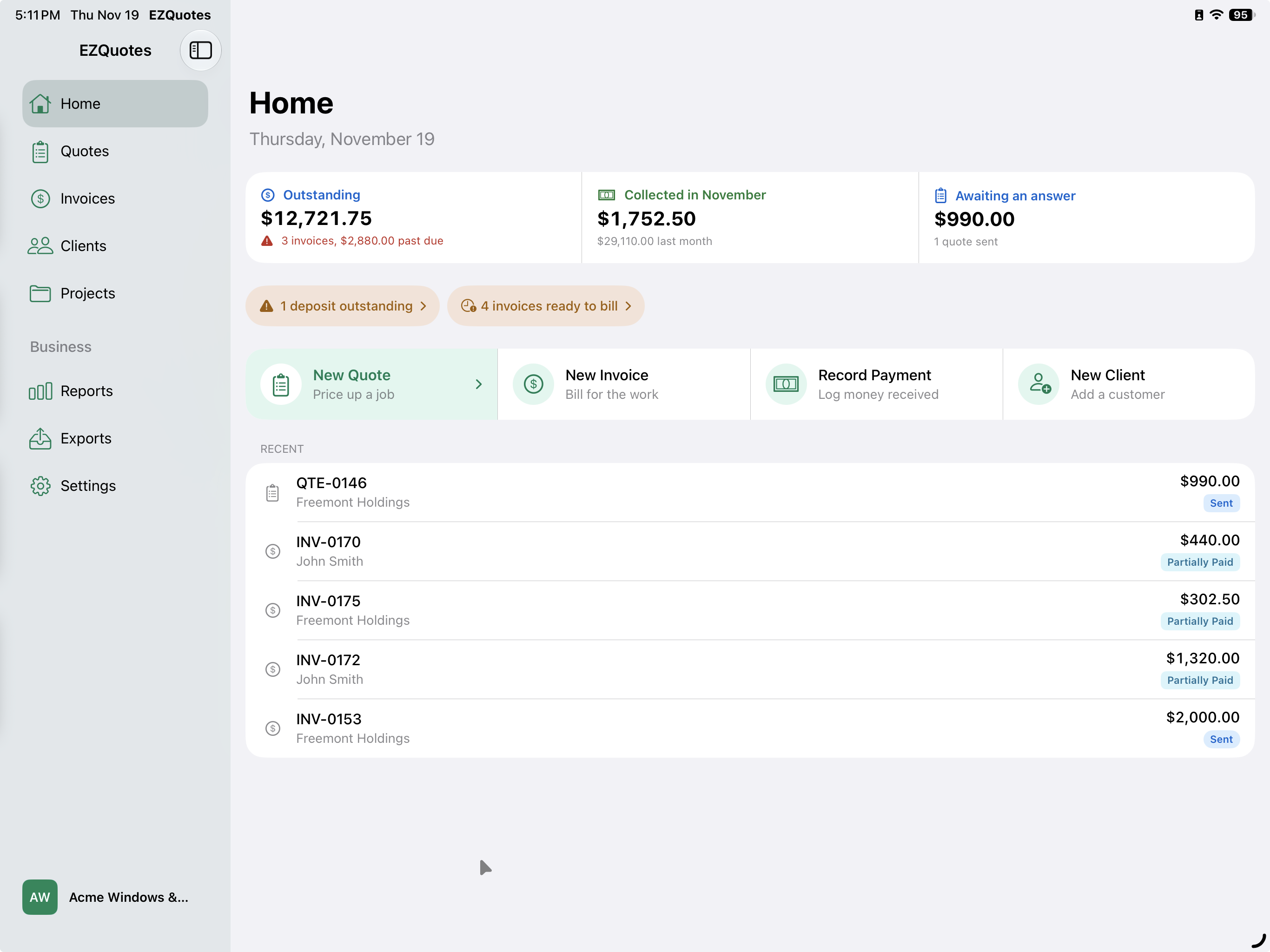
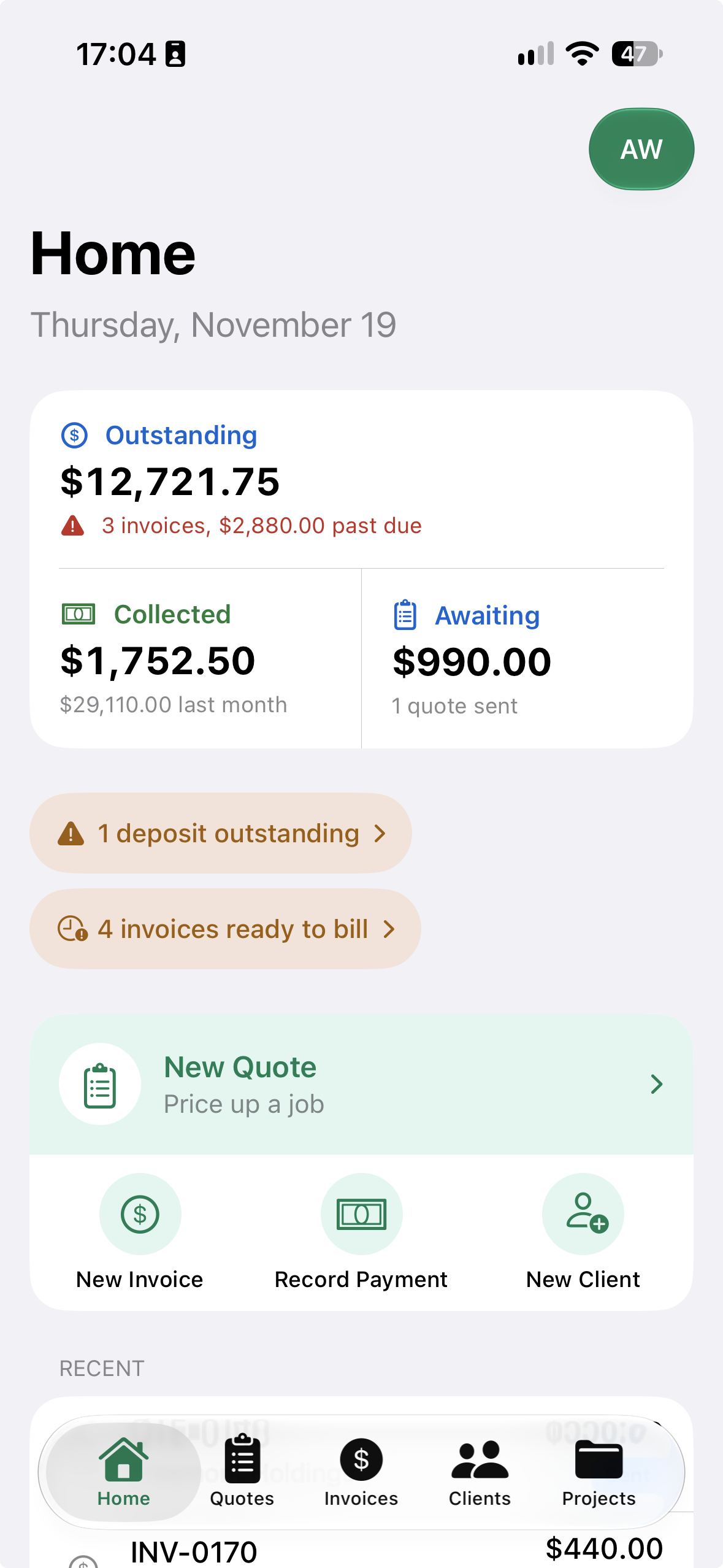
Available on iPhone and iPad. Mac, Android and web coming soon.
Instant Quotes
Create quotes in minutes.
Build a professional quote on your phone, right at the job. Add photos, and tax is calculated for you.
Send & Get Approved
Close jobs quicker.
Send quotes by text or email. Customers approve from the link, with no app to install.
One-Tap Invoicing
Turn quotes into cash.
Turn an approved quote into an invoice with one tap. Nothing to retype.
Get Paid On Time
Stop chasing payments.
Ask for deposits up front. EZQuotes emails customers when a payment is overdue, so you don't have to.
Know Where Every Dollar Is
Your business at a glance.
See money coming in, what's overdue and what needs your attention as soon as you open the app.
Crew Work Orders
Brief your crew without sharing prices.
Send your crew or subcontractor a link with the job details and photos. No app or account needed.
Full feature list
What's ready today and what's on the way.
Quoting
On-site quote builder Available
Walk the job, build the quote on your phone and send it before you leave the driveway. Add materials and labor line by line, and EZQuotes totals it up with your taxes and any discount, so the price is right the first time.
Saved items Planned
You'll be able to create your own items once, with their description and price, and pick them from a list every time you build a quote. Faster quoting, and the same accurate prices every time.
Photo attachments Available
Attach up to 5 photos to any line item. The ones you choose to share appear right in the customer portal, next to the line they belong to, so customers can see exactly what's included.
Automatic tax Available
Set your tax rates once and every quote and invoice adds them for you. Use one rate for everything, or set separate taxes for labor and materials.
Discounts and markup Available
Add a markup to individual items to cover your costs and margin, and take a discount off the whole total when you want to win the job. Both work on quotes and invoices, and totals update automatically.
Customer portal Available
Send quotes and invoices to your customer's phone or inbox as a link, or mark one as handed over in person. It opens as a clean web page on any phone or computer, with no app or login, showing the full breakdown and the photos you chose to share. Customers approve or decline a quote with one tap, download a PDF, or send you a question with the best way to reach them.
Quote revisions and expiry Available
Customer added work, or the scope changed mid-job? Reopen the quote, update it and resend for a fresh approval. EZQuotes keeps every version, so the invoice matches what was agreed. Every quote has a "valid until" date, and you can renew it when you resend.
Duplicate and archive Available
Start a new quote from one you've already written for a similar job. Archive old quotes to keep your list tidy.
Invoicing
One-tap invoicing Available
Turn an approved quote into an invoice with one tap, with every line item and price carried over. No quote? Start an invoice from scratch.
Automatic payment reminders Available
EZQuotes emails customers when a payment is overdue, on a schedule you set, so you don't have to chase. Outstanding deposits get reminders too.
Payments and balances Available
Log checks, bank transfers, cash or wire payments as they arrive, including partial payments and tips. Every invoice shows where it stands, whether sent, partly paid, paid or overdue, so you know who owes what without a spreadsheet.
Deposits and payment terms Available
Set your own payment terms, with invoices due on receipt or in however many days you choose, and add your payment instructions to the invoice. Ask for a deposit up front and bill the balance later, and the invoice shows your customer what's been paid and what's still owed. Invoicing before the job is finished? Start the payment clock on completion instead.
Credit notes Available
Job came in smaller than invoiced? Add a credit note with the amount before tax and what wasn't delivered, and EZQuotes recalculates the tax and the balance due. No need to void the invoice and start over.
Disputes and refunds Available
Customer pushing back on an invoice? Mark it as disputed, then resolve it with a note on what was agreed and a credit if you're giving one. Refunds are recorded too, and it all stays in your invoice history.
Duplicate and void Available
Sent an invoice that needs more than a credit? Duplicate it, make your changes and void the original. The old one stays in your records, marked void.
Pay by card Coming soon
Your customers will be able to pay by card right from the invoice link. Payments run through Stripe and are recorded on the invoice automatically, so the balance is always up to date.
Clients & Jobs
Client management (simple CRM) Available
Every customer in one place, searchable, with your most recent ones at the top. Open a customer's record to call, text or email them in one tap, see their quotes and invoices with what they still owe, and start a new one right there. Each job site gets its own address, so landlords, builders and repeat customers stay organized.
Projects Available
Group related quotes and invoices into a project so the whole job is in one spot, with its site address. Mark each project active, paused or completed and give it a due date, so you can see at a glance what's on the go and what's due next. Useful when one job runs to several quotes or stages.
Crew
Crew work orders Available
Send your crew or subcontractor a link with the scope, site address and photos, but no prices. No app or account needed. Send the same job to more than one crew, each with its own link that expires on the date you set, and withdraw one or all of them any time.
Job completion from the field Coming soon
Your crew will be able to mark the job complete right from the work-order link.
Extra work from the field Coming soon
Your crew will be able to report extra work and add photos from the link, so changes reach you before the invoice goes out.
Team
Team accounts Planned
You'll be able to invite your team, each with their own login and a role to match: admin, supervisor, estimator or view-only.
Business
Business dashboard Available
Open the app and see what's outstanding and how much is past due, what you've collected this month against last month, and the value of quotes still waiting on an answer. No reports to run.
Needs-attention alerts Available
The home screen flags what needs you today, like an unpaid deposit or an invoice whose job hasn't been marked complete. Mark it complete to start the payment clock, or snooze it if the work is still going.
Reports Planned
You'll be able to see your revenue and the tax you've collected for any period, like a month, a quarter or your year-end, and download the report to send to your accountant.
Export to accounting apps Planned
You'll be able to send invoices and payments straight to QuickBooks or Xero, or export them as a CSV file for any other accounting software, so nobody has to retype them.
Platform
iPhone and iPad app Available
The full app on your iPhone for the job site, and on your iPad when you want a bigger screen. During the private beta, you install it through TestFlight.
Mac app (macOS) Coming soon
The same app is coming to your Mac, for when you'd rather do the paperwork at a desk. Sign in with the same account and everything will be there, so you can start a quote on site and finish it at the office.
Web and Android apps Planned
EZQuotes on Android phones and in any web browser, with the same features as the iPhone and iPad app.
AI assistant Planned
You'll be able to describe the job out loud or snap a few photos, and the assistant will draft the quote's line items for you to check and confirm. You'll also be able to ask it about your numbers, like who still owes you or how this month compares to last.
Ready to get started?
Join the private beta and be first to try EZQuotes.